Open Source Licenses: Which One Should You Choose?
If you’ve ever published a software project online, you’ve likely faced the big question:
“Which open-source license should I use?”
It might sound like a boring legal checkbox — but your license determines how others can use, modify, and share your work. Pick one that’s too restrictive, and you might scare away contributors. Pick one that’s too permissive, and your code might be used in ways you didn’t expect.
In this guide, we’ll break down:
- What an open-source license actually is
- The main categories of licenses
- Common licenses and their pros/cons
- How to pick the right one for your project
- Real-world examples to make it crystal clear
1. What Is an Open-Source License?
An open-source license is a legal document that defines how others can use your software. It ensures that:
- You keep ownership of your work
- You set the rules for usage, distribution, and modification
- Your users (and contributors) know what’s allowed and what’s not
Without a license, your code is technically “all rights reserved” by default, meaning nobody can legally use, share, or modify it — even if you’ve posted it publicly on GitHub.
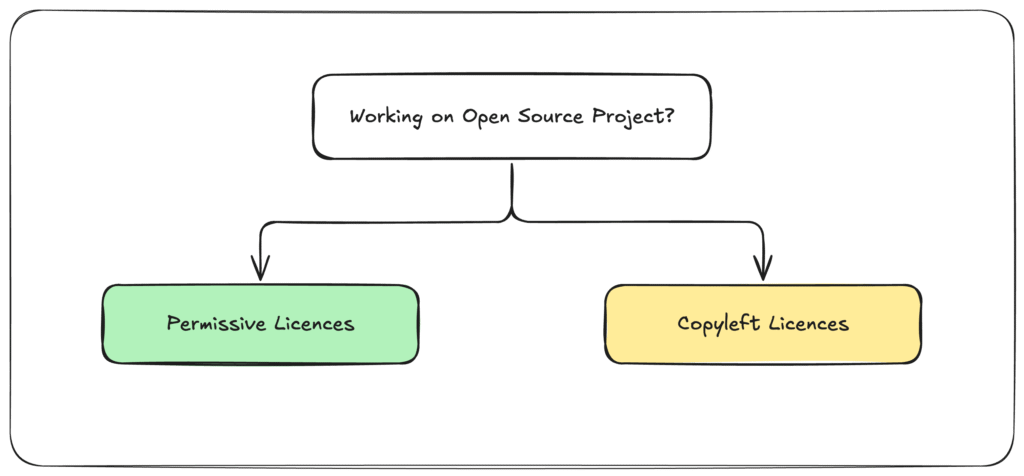
2. The Two Big Families of Open-Source Licenses
While there are dozens of licenses, most fall into two main categories:
A. Permissive Licenses
- Core idea: "Do whatever you want, just give me credit."
- They allow commercial use, modification, and distribution with minimal restrictions.
- Popular with startups, hobby projects, and tools that aim for wide adoption.
- Examples: MIT, Apache 2.0, BSD
Pros:
- Encourages wide adoption
- Easier for companies to integrate your code
- Minimal legal overhead
Cons:
- Others can take your code, make it proprietary, and never contribute back
B. Copyleft Licenses
- Core idea: "You can use and modify this, but your changes must also be open source."
- Designed to keep derivative works open and free.
- Strong copyleft licenses (like GPL) require all linked code to be licensed under the same terms.
- Examples: GPLv3, AGPL, LGPL
Pros:
- Ensures the software and derivatives stay open-source
- Protects against closed-source commercialization
Cons:
- Can scare off companies who don’t want to release their source code
- More legal complexity
3. The Most Common Licenses (and When to Use Them)
Here’s a breakdown of the most used licenses, what they mean, and examples of famous projects that use them.
MIT License
- Summary: Extremely short and simple. You can use, copy, modify, merge, publish, distribute, sublicense, and sell copies of the software — as long as you include the original license and copyright.
- Best for: Developers who want maximum adoption and don’t mind if their code is used in closed-source products.
- Used by: jQuery, Rails, Node.js
- Pros: Simple, permissive, widely understood
- Cons: No protection against closed-source forks
Apache License 2.0
- Summary: Similar to MIT but with an additional patent grant that protects users from patent litigation by contributors.
- Best for: Projects that may involve patents or want explicit protection for users and contributors.
- Used by: Apache projects, Kubernetes, Android
- Pros: Permissive + patent protection
- Cons: Longer and more complex than MIT
BSD Licenses (2-Clause, 3-Clause)
- Summary: Older permissive licenses similar to MIT but with slightly different wording and some attribution clauses.
- Best for: Academic and research projects.
- Used by: FreeBSD, OpenBSD
- Pros: Permissive, well-established
- Cons: Less popular than MIT/Apache for modern projects
GNU General Public License (GPL) v3
- Summary: Strong copyleft — any software that incorporates GPL code must also be GPL and open source.
- Best for: Projects where you want to ensure improvements stay open.
- Used by: WordPress, Linux Kernel (GPLv2), VLC
- Pros: Forces contributions back to the community
- Cons: Not business-friendly for proprietary integration
GNU Affero General Public License (AGPL)
- Summary: Like GPL, but also closes the “SaaS loophole” — if you run the software as a service, you must release your changes.
- Best for: Web applications that you don’t want re-hosted without open-sourcing modifications.
- Used by: MongoDB (previously AGPL), Nextcloud
- Pros: Protects against closed SaaS deployments
- Cons: Can deter commercial adoption
Lesser General Public License (LGPL)
- Summary: Weak copyleft — you can link LGPL libraries into proprietary code without releasing your own code, but changes to the LGPL library itself must be open.
- Best for: Libraries that want to stay open but still be used in closed-source software.
- Used by: FFmpeg, GTK+
- Pros: Balanced approach between open-source and commercial usage
- Cons: Still more restrictive than MIT/Apache
4. How to Pick the Right License for Your Project
Think about your goals:
| Goal | Best Fit |
|---|---|
| Maximum adoption & fewer restrictions | MIT or Apache 2.0 |
| Keep code and all derivatives open | GPLv3 |
| Protect against SaaS exploitation | AGPL |
| Allow closed-source use but keep library itself open | LGPL |
| Patent protection included | Apache 2.0 |
In simple words:
- Want your code to be usable by anyone, even in proprietary apps?
→ MIT or Apache 2.0 - Want all improvements to stay open-source?
→ GPLv3 - Worried about SaaS companies taking your work without sharing?
→ AGPL - Making a library for both open and closed-source apps?
→ LGPL
5. Real-World Examples
- Linux Kernel → GPLv2 — Keeps the core open, forces derivative works to stay open.
- React → MIT — Encourages adoption across startups and enterprises.
- Kubernetes → Apache 2.0 — Wide corporate adoption + patent protection.
- Nextcloud → AGPL — Protects against hosted competitors not sharing code.
6. Quick Tips for Adding a License to Your Project
- Use GitHub’s “Add a license” option when creating a repo.
- Include a
LICENSEfile in your root directory. - Add a license header in each source file (optional but good practice).
- Clearly state the license in your README.
Final Words
Your open-source license isn’t just legal boilerplate — it’s a strategic decision. It shapes who uses your project, how it grows, and how contributions flow back.
If you’re unsure, MIT or Apache 2.0 are safe defaults for permissive licensing, while GPLv3 is a strong choice if keeping the code open is your top priority.
Remember: choosing a license before releasing your project is much easier than changing it later.